
• Platform
  • Operations
  • Rotas & Scheduling

Rotas built in minutes, not hours.

Drag, drop, publish. Conflicts caught before the rota goes out — and updated automatically when plans change.
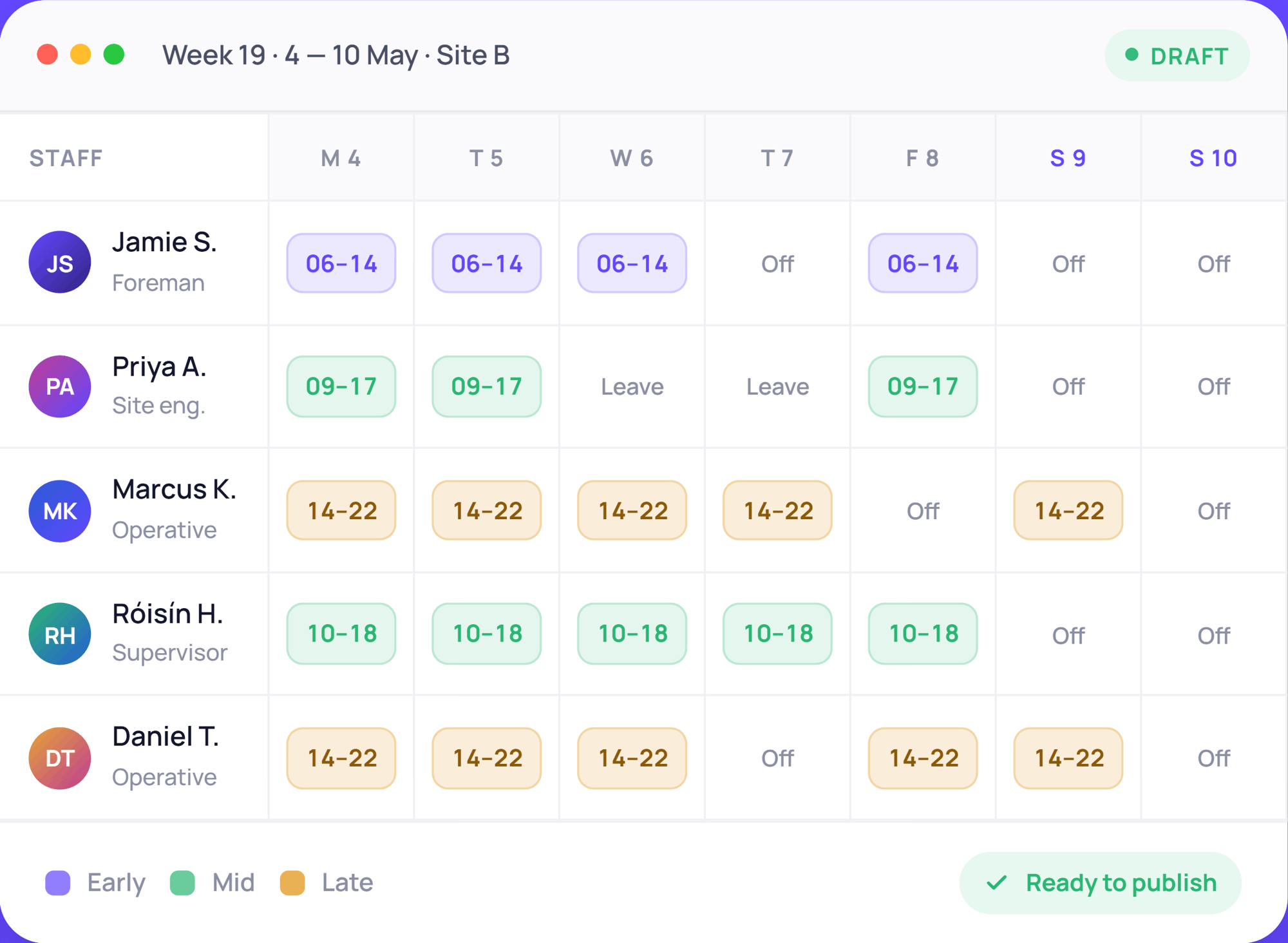
Rotas and Scheduling - week-rota 4-10 May 2026

x

faster shift scheduling for multi-site teams

%

of scheduling admin automated

%

compliance accuracy with built-in safeguards

Who it helps

One system.
Useful for everyone.

Operations Managers

Build and publish rotas in minutes.

Drag-and-drop scheduling, bulk edits and instant sharing. No spreadsheets, no back-and-forth emails.

HR Teams

Compliant rotas without the legwork.

Working time rules, rest periods and overtime limits enforced automatically. Audit-ready records built in.

Business Owners

Control costs before shifts happen.

Set shift budgets, track labour spend in real time, and prevent overstaffing before it costs you.

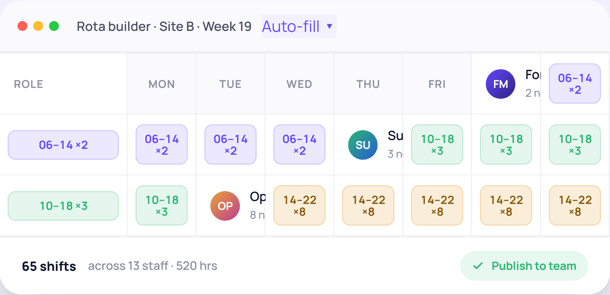
Rotas and Scheduling - rota-builder for Week 19

Rota building

Build a week's rota in minutes.

Drag-and-drop scheduling, bulk edits, one-click publishing — whether you're building from scratch or duplicating last month's pattern.

  • Drag-and-drop scheduler for quick edits and adjustments
  • Auto-scheduling based on availability, contracts and roles
  • One-click duplication for recurring shift patterns
  • Bulk edits to update multiple shifts at once
  • Instant rota sharing via app, desktop and email
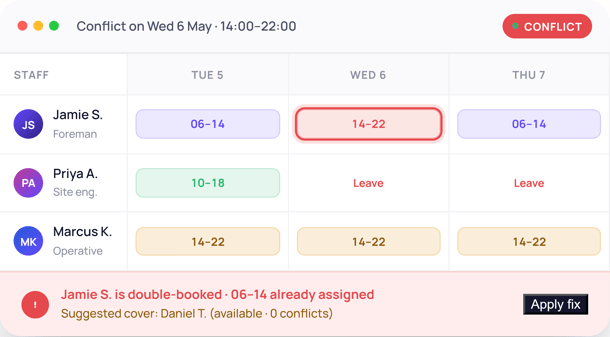
Rotas and Scheduling - conflict-alert on Wed 6 May

Conflict detection

Spot the gaps before they become problems.

Double-bookings, understaffed shifts and unavailable staff caught the moment they happen — with one-tap suggestions to fix them.

  • Real-time detection for double-bookings and clashes
  • Automatic backfill suggestions when shifts go uncovered
  • Instant alerts when a shift change creates a gap
  • Live schedule visibility across all teams and locations
  • Full audit trail of every rota change
Rotas and Scheduling - shifts-mobile dashboard

Employee self-service

Staff manage their own availability. You stay in control.

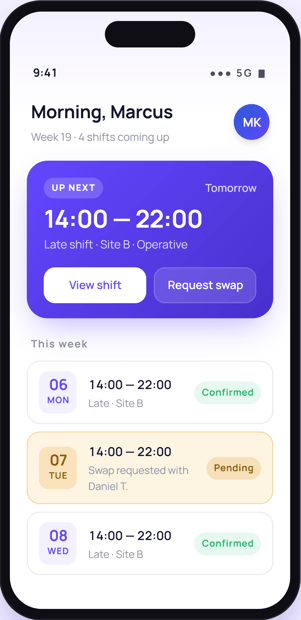
Employees view rotas, request swaps and update availability from their phone — every change comes to you for approval.

  • Shift swap requests routed to manager for approval
  • Availability and preference tracking for smarter scheduling
  • Employee portal to view current and upcoming rotas
  • Push notifications for shift reminders and changes
  • Fair shift allocation to prevent burnout and disputes
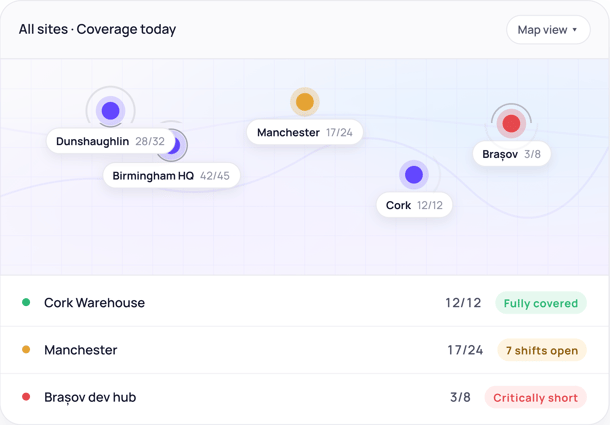
Rotas and Scheduling - coverage-today for all sites

Multi-site scheduling

One view across every site and department.

Two locations or twenty — head office and site managers see the same picture, without stepping on each other's toes.

  • Centralised scheduling hub for all sites and departments
  • Role-based access so managers only see their teams
  • Location-based rules for different shift structures
  • Flexible assignment by skill, seniority or contract type
  • Central dashboard showing coverage across all rotas
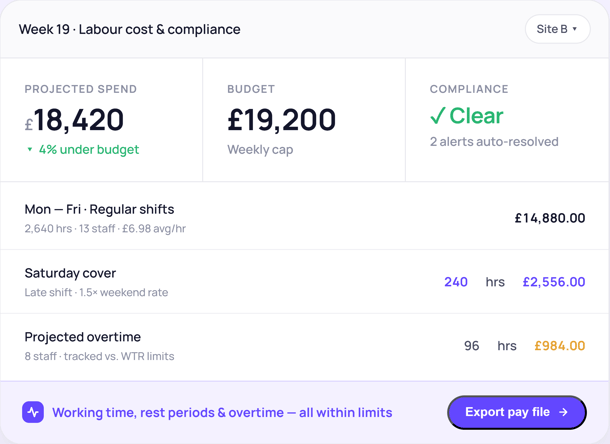
Rotas and Scheduling - labour-compliance budget

Budget & compliance

Costs down. Compliance covered.

Track labour spend in real time and stay on the right side of working time law — without leaving the rota builder.

  • Shift cost tracking against daily, weekly and monthly budgets
  • Working time regulation alerts before limits are breached
  • Rest period enforcement built into the scheduler
  • Overtime tracking to manage labour costs
  • Audit-ready scheduling records for compliance checks

Also included

Everything your team needs in one place.

Time & attendance

Clock-ins and worked hours flow straight into the rota — no double entry, no spreadsheets in between.

Approved leave sync

Holidays and absences are blocked out on the rota automatically. No accidental scheduling, no chasing.

Analytics & reports

Labour cost data, attendance trends, workforce insights. Exportable in seconds.

Employee self-service

Staff check rotas, swap shifts and update availability themselves. Fewer manager queries.

Working time alerts

Rest periods, weekly hours and overtime tracked automatically. Compliance baked in.

GDPR-compliant

All data stored securely. Role-based access controls throughout.

We used to spend the best part of a day a week building rotas. Now it’s an hour, conflicts catch themselves, and the team get their schedule on their phone the moment we publish.

Kat Ryan

Head of People, Apex

Built for your industry

Configured for the operations where shift planning never stops.

  • Construction

  • Healthcare

  • Hospitality

  • Manufacturing

  • Retail

Trusted by operations teams across the UK & Ireland

longacres-landscape 1
Layer_1 (11)
logo 1
Layer_1 (12)
logo (1) 1
Clip path group
longacres-landscape 1
Layer_1 (11)
logo 1
Layer_1 (12)
logo (1) 1
Clip path group

See it for yourself

See it working for your operation.

A free, no-obligation demo. We’ll show you exactly how HR Duo builds, publishes and controls rotas for your industry and team size.

FAQs

How long does it take to build a rota?

For a typical 30-person team, a fresh weekly rota takes 5–15 minutes. With auto-fill and pattern duplication enabled, a manager can publish next week from last week’s template in under a minute — then make small adjustments by drag-and-drop.

Can the system auto-fill rotas based on availability?

Yes. Auto-scheduling looks at contracts, roles, certifications, availability windows and approved leave to suggest a complete rota. You can accept the whole suggestion or tweak individual shifts before publishing.

How are conflicts and double-bookings handled?

Conflicts are flagged in real time as you build — double-bookings, overlapping shifts, approved leave clashes, working-time breaches. Each one comes with a one-tap suggested fix, like a backfill from an available employee.

Can employees swap shifts themselves?

Yes. Staff request swaps from the mobile app, the system checks both employees are qualified and available, then routes the request to the manager for one-tap approval. Both employees get notified the moment it’s confirmed.

Does it work across multiple sites and departments?

Yes. Site managers see only their teams; head office sees the whole picture. Different sites can run different shift structures, pay rules and approval flows — all in one platform.

How does it help with labour costs?

Every shift you draw shows projected cost in real time, against your daily and weekly budget. Overtime, weekend rates and contracted hours are all factored in — so you see budget impact before you publish, not after.